Saturday, 15 April 2017

How Did America Get Its Name?

The global population currently sits at just over 7.4 billion people, and nearly all of them have heard of the United States of America. As a dominant superpower for the past century, the shortened version – America – can stir pride, admiration, fear, envy, or distrust in the minds of people in every corner of the globe. However, as every child in America learns, the country was first discovered by Christopher Columbus in 1492.
So why isn’t the country named Columba?

The Strange Tale of Amerigo Vespucci

The exploits of Christopher Columbus are well known to most school-children, and even the name Amerigo Vespucci is widely circulated through international culture, but the exact details of the latter legend are usually unknown, and the two men’s relationship is often viewed as a mystery.
Amerigo Vespucci was an Italian explorer, cartographer and navigator that also made a number of trips across the Atlantic, just like Christopher Columbus. However, prior to that, he worked in the commercial house of the Medici family in Florence, and helped to manage financing and supplies for a number of expeditions across the ocean, including some of Columbus’ later voyages. While Columbus initially had a monopoly on expeditions to the West Indies, by 1495, other navigators were granted licenses to explore the new area of “India”.
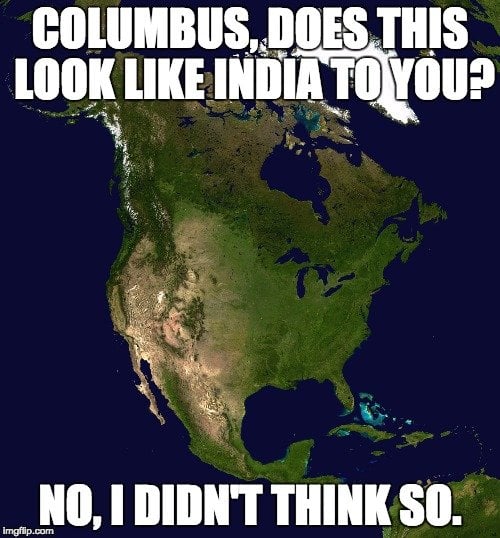
Now, it is important to remember that Christopher Columbus, despite landing in the Bahamas in 1492, believed for more than a decade that he had found a western route to India. Even after numerous expeditions to parts of the Caribbean and America, he remained certain that he had made his way to Asia.
1bnj5r
Over his years of service in the mercantile industry of Europe, Vespucci had earned respect and built connections across the continent. He was eventually invited by King Manuel I of Portugal to join an expedition across the ocean, which would eventually explore the southern coast of this “new continent”. Between 1499 and 1502, roughly 7-10 years after Columbus’ legendary voyages, Vespucci found that the southern coast of “India” went much further south than previously thought.
During the 1499 trek, he and his company explored the northern part of South America, and reached the Amazon River. At that point, he falsely believed that he was in India, just like Columbus. There was some anecdotal evidence – and a potentially forged letter – that Vespucci had actually been on an earlier expedition in 1497 that reached Central America. If this were true, that means that Vespucci had actually reached the mainland of the Americas before Christopher Columbus!

1bnisz

Given the unproven nature of those claims, historians agree that Vespucci’s 1501 expedition is where he solidified his reputation as a legendary explorer. On this trip, he traveled down the southern coast of south America, past present-day Rio de Janeiro, all the way to within 400 miles of the continents southern tip.
At this point, he was confident that his expedition (as well as Columbus’ before him) had not actually reached India, but a completely new continent, one that was not part of the “Old World” (Europe, Asia and Africa).

Amerigo’s Rise to Fame

During his series of expeditions, Amerigo Vespucci wrote numerous letters back to colleagues and friends in Europe, describing the places he had been and the wonders he had seen. Furthermore, he wrote books about his travels once he returned, both in 1502 and 1504, in which he referred to Central, South and North America as “Novus Mundi” (translated as “The New World”).
Amerigo Vespucci was the first to claim and essentially prove that the land mass he, John Cabot and Christopher Columbus had all explored was not India, but rather a completely unknown continent. His writings were vivid and entertaining, and caught the attention of publishers and citizens across Europe. These books were reprinted in dozens on European languages, and his accounts became some of the best sources for information on the New World. Christopher Columbus, on the other hand, had never written publicly about his “discovery”, but had continued to claim that he had landed in India.
Five years later, Martin Waldseemüller, a German cartographer, made a map of this exciting new world, and used Vespucci’s writings as the main source material for their topographic information. When they published the map, they placed the word AMERICA across the land mass, honoring the navigator to whom they attributed the discovery. Within 30 years, present-day North America had been added to that New World Map, and cartographers attributed the name America to that part of the continent as well. The rest, as they say is history.

An Alternate Explanation?

While historians and scholar have reached a general consensus on Amerigo Vespucci as the namesake of America, there is another explanation cited by some. While Columbus and Vespucci get much of the credit for early discoveries of the New World, English fishermen had been in Newfoundland, high on the northeastern coast of the continent, decades earlier.
A man named Richard Amerike, a wealthy English merchant from Bristol, was also a senior member of the Fellowship of Merchants and a customs officer. Trade records have shown that in 1481, Amerike shipped a load of salt (in order to salt fish) to these early sailors/fishermen. The belief is that those sailors named the region in which they were fishing after their sponsor – Amerike.

1bnjhm
Furthermore, Richard Amerike was reputed to own the ship, the Matthew, which carried the expedition of John Cabot to Newfoundland in 1497. The belief is that Cabot named the territory where he landed America, and included that name on an early map.
In the early 20th century, the idea that America was actually named in honor of this man, Richard Amerike, was raised in academic circles. Letters in the Spanish National archives show that Columbus had received a copy of this earlier map, complete with the name “Amerike” on the land mass. Unlike the Italian explorers, who were eager to claim international credit for their discovery, the Bristol sailors and merchants were interested in keeping their lucrative fishing grounds a secret, which is why this alternative theory of America’s name has rarely been considered.
We may never know the real origin of America’s name, but these are certainly the leading contenders.  In the eyes of the majority of the world, Amerigo Vespucci’s name will go down in history, while Christopher Columbus will retain the exploratory glory!

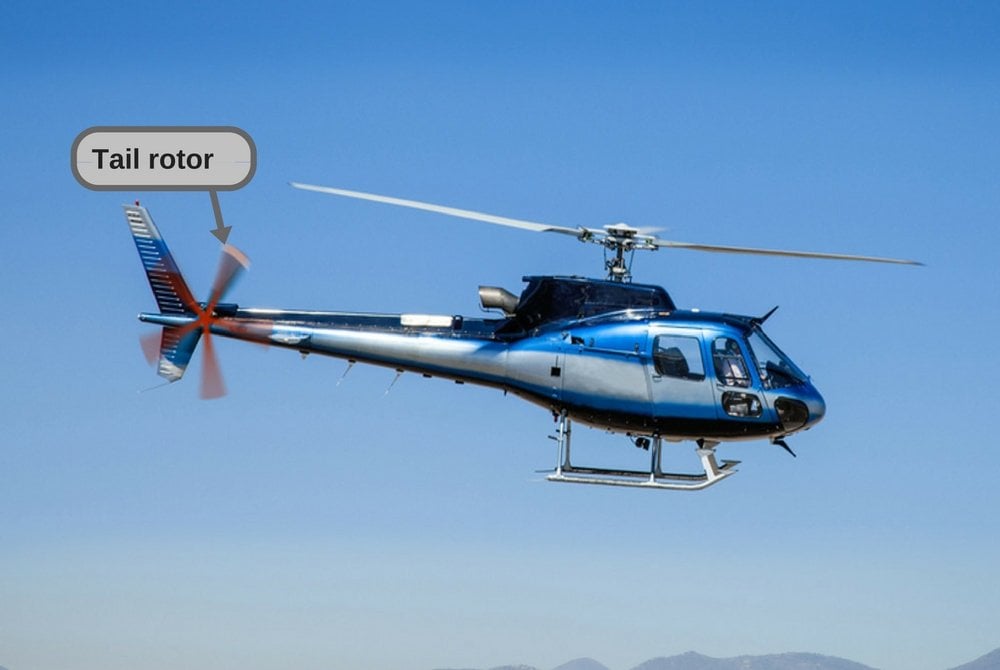
Why Do Helicopters Have A Tail Rotor?

We all might be having doubt as to why is a small blade fitted over the tail of a helicopter.
Now without stretching time heres a short answer.

Helicopter in flight. Fly over the mountain and blue sky.


SHORT ANSWER-The tail rotor is there to make sure that the helicopter doesn’t simply fly in circles. Yes, it also helps to turn the helicopter.

Flight of a Helicopter

A helicopter flies/hovers by generating lift with its main rotors. The rotating blades push the air down, which in turn pushes the helicopter up, keeping the entire craft airborne. However, there’s one important catch here…

When the fuselage starts to rotate…

According to Newton’s third law of motion, for every action, there is an equal and opposite reaction. What this means is that when you apply a force on a body in a given direction, that body applies an equal amount of force on you, and in the direction opposite to your application of force. There are numerous practical examples of this phenomenon: the recoil of a gun, the launch of a rocket, how that same rocket turns in space, lifting heavy weights… the list is endless.

Torque

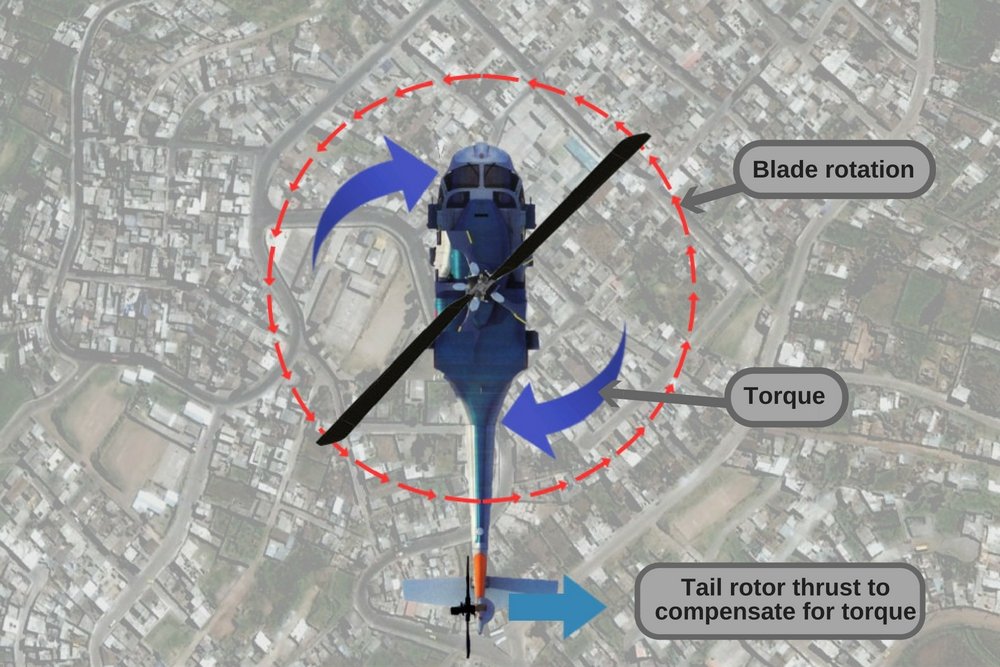
Helicopter tail rotor blade rotation torque
Applying the third law of motion to the case of helicopter rotors, you would see that since the main rotors turn, say, counter-clockwise, the fuselage (the body of the chopper) would be pushed in a clockwise direction. Simply put, the helicopter would turn in circles in the opposite direction of the blades’ rotation.
Let me illustrate this with an example: sit in a swivel chair and don’t let your feet touch the ground. Now, try to rotate the chair counter-clockwise. You would notice two things: one, it’s much more difficult than you first imagined; and two, you’d be turning clockwise, despite trying to turn in the opposite direction.
Essentially, the same thing happens with a helicopter, where the main rotors, while turning in one direction, push the fuselage the opposite way. Looking at a helicopter that’s turning in circles (some sight that would be!), a physicist would immediately note that it’s rotating due to ‘torque’, a twisting force that causes an object to rotate.

The role of the tail rotor

Countering the torque

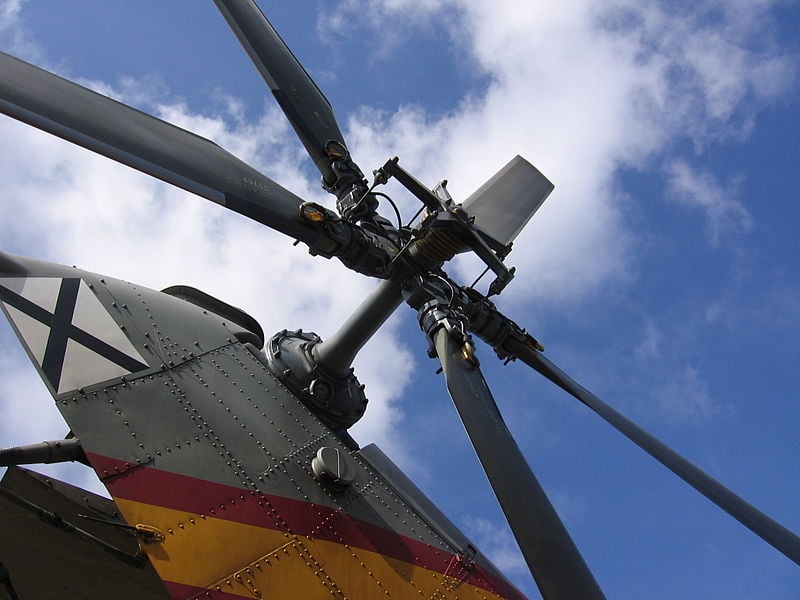
tail rotor
Traditional tail rotor of an Aérospatiale Puma
The tail rotor is a vertical (or near-vertical) set of blades mounted at the end of the tail of the chopper. It ensures that the torque produced by the main rotors is properly compensated for by ‘pushing’ the chopper in the opposite direction of the torque. By doing this, it ensures that the chopper doesn’t wobble and remains stable in flight. This is why a helicopter is in serious trouble if its tail rotor is damaged.
Caption: Notice that the chopper comes spiraling down once its tail rotor is hit (Image of  ARMA 2, the video game)
Furthermore, the tail rotor’s position and distance from the center of gravity of the chopper provides thrust in the same direction as the main rotor.
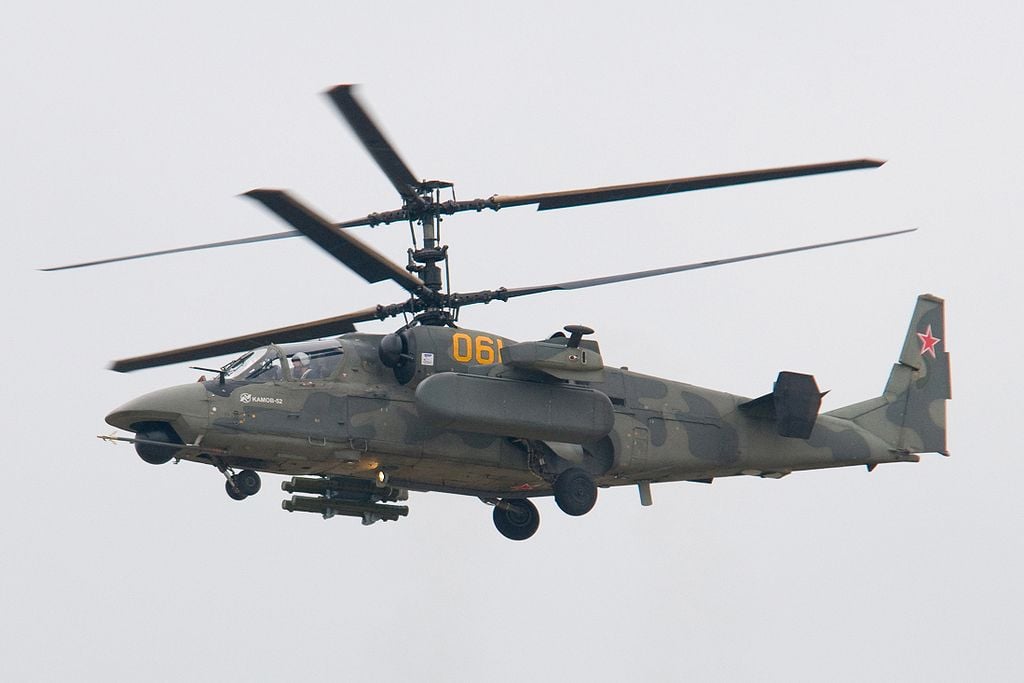
It should be noted that using a tail rotor is not the only way to compensate for the torque; coaxial rotors can also achieve the same thing.
coaxial rotors
Russian Air Force Ka-52, a chopper with two main rotors and no tail rotor 

Turning the chopper

In addition to counteracting the torque produced by the main rotor, the tail rotor can also be used to turn the chopper in a desired direction by altering the pitch angle of the rotor blades. Directional control is achieved by the pilot when he changes the pitch of the blades using anti-torque pedals, which are installed in the cockpit.
There are certain drawbacks of tail rotors, such as making the chopper louder and using up some of the available engine power that could be used to generate lift. While both of these problems are accounted for in choppers with coaxial rotors, those variants have their own disadvantages too. In effect, whether you want to use a conventional helicopter with a tail rotor or a chopper with multiple rotors depends entirely on your operational requirements. Either way, be safe up there!

Monday, 19 December 2016

Why Do Hard Drives/USB Drives Show Less Space Than Advertised When Plugged In?

When I bought my first USB flash drive a few years ago (2 GB), I was rather shocked to see that it only showed 1.95 GB as my total available space. Feeling robbed of the remaining 0.5 GB by the manufacturer, I looked it up on the Internet and found (admittedly, to my relief) that every other hard drive user had the same concern.
You can see this for yourself right now. Take any digital storage device (e.g., USB flash drive, hard drive, SD card etc.) and plug it into a Windows computer. You will notice that the total available space displayed on the computer is slightly less than the advertised capacity of the device. For instance, if you plug in a 16 GB USB drive, the total available space on a Windows computer would be around 15.6 GB – around 0.4 GB short of the advertised capacity.
Why does this happen? Why do Windows devices and some older versions of MacOS show a total available space that is different from what’s advertised? Some people might claim that this is a classic example of false advertising by marketers, or that the manufacturers are purposely lying about the capacity of hard drives, but is that really the truth?
Short answer: Common programs, including Windows, system BIOS and some old versions of MacOS, use the binary number system, where 1 GB amounts to 1024 MBs, rather than 1000 MBs, which leads to this anomaly in storage devices.
Before trying to understand the reason behind this anomaly, it’s important to know a thing or two about MBs, GBs and TBs – the units used to express the capacity of storage devices of different types.

Understanding the basics: kB, MB and GB

The smallest entity used to measure the capacity of storage devices is a rather aptly named unit called a ‘bit’. A sequence of 8 bits make up a ‘byte’; it is this sequence of 8 bits that is processed as a single unit of information. A cluster of 1000 bytes makes up a kilobyte (kB).
but-everyone-says-meme
Many people might tell you that 1 kB has 1,024 bytes, and not 1,000 bytes, and that you should get your computer basics straight. However, those people are confused, just like millions of other computer users all over the world.

Decimal system vs. Binary system

Note that the amount of disk space consumed by a file depends on the file system itself. Now, many popular programs and operating systems, including Microsoft Windows (the most commonly used operating system for computers), system BIOS, FDISK and even some old versions of macOS follow the binary numbering system (with base 2). There is a reason behind that too, but for the scope of this article, suffice to say that it’s convenient within the computer to organize things in groups of powers of 2. Therefore, 1 kB contains 2^10 = 1024 bytes.
However, there’s a catch…. the metric prefixes (e.g., kilo, mega, giga) that we use for measuring the storage capacity of hard drives are all decadic, meaning that they are all expressed as powers of 10 (and not 2).
This prefix system is great for the decimal system, but in a binary system – the one that Windows and many other programs use – the terms kilo, mega, giga etc. do not even exist. Since they work with powers of 2, they use slightly different prefixes to express large numbers. For example, 1024 bytes make up 1 kibibyte, which is represented as KiB. Similarly, 1024 kibibytes make up 1 Mebibyte (MiB). Below is a table to help you understand this better:
Multiples of bytes table
A lot of confusion between the true storage capacity of a device stems from the way these units are commonly written or printed. People mistakenly use the units of the decimal and binary system interchangeably. For example, the unit ‘KiB’ is casually written as ‘KB’ and is therefore mistaken for ‘kilobytes’, but it actually represents ‘kibibytes’. The same goes for MiB and MB (mebibytes and megabytes) and TiB and TB (tebibytes and terabytes).

Do manufacturers falsely label their storage devices to show more capacity?

That answer is a big NO.
manufacturers-always-fool-custo-meme
It is the manufacturers (and not programs like BIOS, Windows etc.) that correctly use the prefix mega and giga, i.e., they use the powers of 10 to express storage capacities when labelling their products.
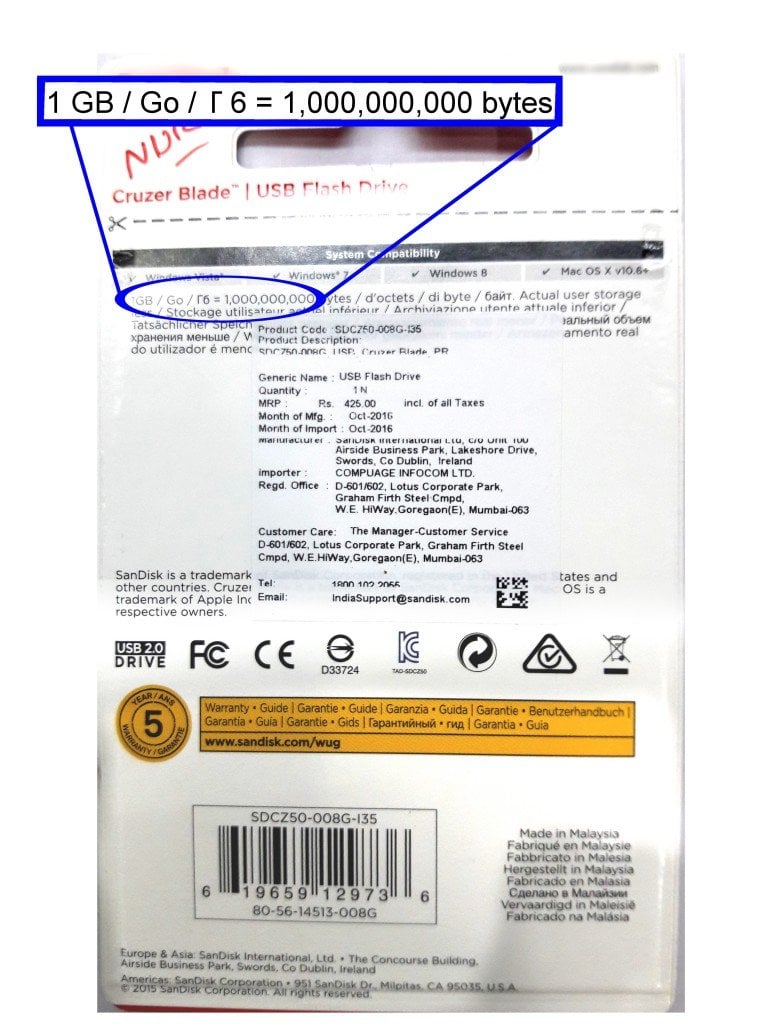
Take a look at this picture of the back side of the packet of a USB flash drive that I recently bought:
pendrive-cover1
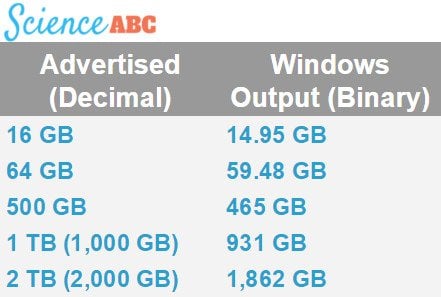
Notice that it clearly mentions on the cover that 1 GB = 1,000,000,000 bytes. The best way to check the true capacity of your drive is to check the number of ‘bytes’, rather than MBs and GBs, as the latter could be somewhat confusing. For manufacturers, 1 MB is 1000 kB , but for Windows, 1 MB is 1024 KB (which is actually 1024 kibibytes). This is why, when you plug a storage device into a Windows computer, the total available space appears slightly less than what’s advertised.
Below is a table showing the anomalies in storage capacity as they appear on Windows:
Windows output (Binary)
Note that Windows could update their user interface and simply use the decimal system to display total capacity. That’s what Apple’s OS X has already done.
The next time you buy a storage device, such as an external hard drive, for your computer and notice that its available space is less than the space advertised on its packaging, don’t fret. Just check the packaging and verify whether its capacity is 2 TB or 2 TiB. Better still, check the number of ‘bytes’ that the hard drive can handle. At that point, you can easily calculate its correct total capacity. Also, if it’s a Windows machine that you’ve plugged it in, it’s bound to show less space than what’s printed on the cover. However, don’t jump to the conclusion that you’ve been cheated out of those 50 GBs by the manufacturer – they’re just trying to be honest!

Friday, 16 December 2016

How Does Wireless Inductive Charging Work?

Back in the day, when smartphones were not as ubiquitous as they are today, people relied on clunky telephones that only had two vital components – the dialer and the handset. In those days, people probably didn’t take the idea of a portable telephone that could be toted around in their pockets very seriously… it would have sounded like science fiction!
you-didnt-need-a-smartphone-to-poop-meme
Fast forward to today, where it would be an uphill task to find someone who doesn’t carry a phone everywhere they go. However, a very common issue with smartphones is battery drain – their tendency to discharge their stored energy quite rapidly. Although recharging phones through wired adapters is still the most commonly seen method, wireless charging has signaled a new era of recharging phones’ batteries without the need for wires. In this article, we are going to look at how wireless charging works and whether it is safe.

Inductive charging

More commonly referred to as ‘wireless charging’, inductive charging works on the same principle as induction cooktops – electromagnetic induction, or simply induction.
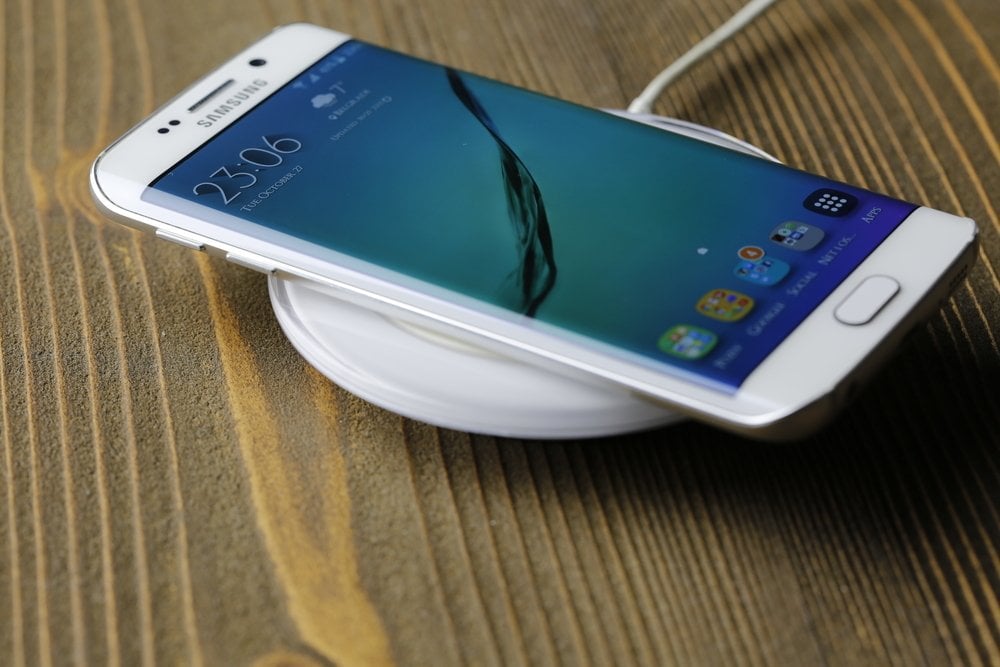
smartphone inductive charging using a mat
A smartphone placed on a base plate for inductive charging (Photo Credit : Nebojsa Markovic / Shutterstock)
Electromagnetic induction results in the production of voltage across a conductor placed in a changing magnetic field or a conductor moving through a stationary magnetic field.

How does inductive charging work?

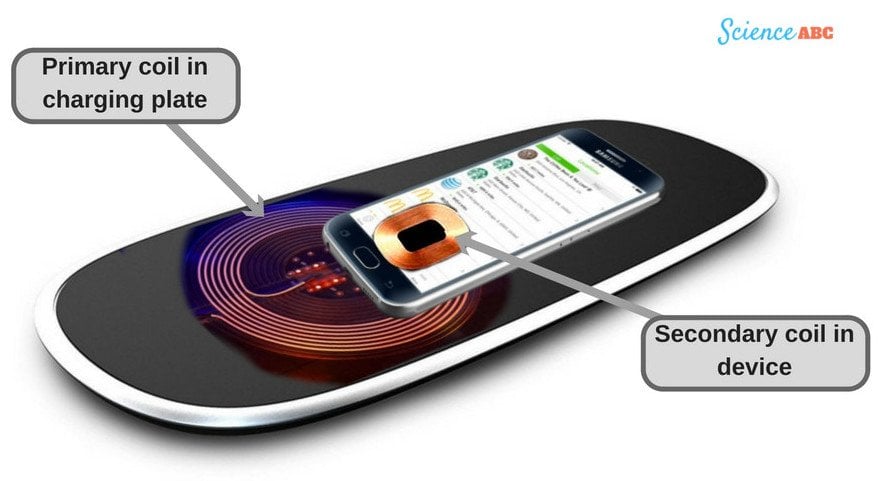
Induction chargers consist of two primary induction coils. One is housed in the ‘charging base’ (commonly known as the ‘mat’) and is responsible for generating an alternating current (AC) from within the base. The other is in the portable device in need of a charge (like a smartphone, tablet etc.). The coil might be in the form of a pad that clips to your phone, a circuit embedded inside your phone, or a replacement battery cover with a built-in charging coil that gets connected to the charging socket. Together, these two coils make up an electrical transformer.
Mobile wireless chargning
When the power supply to the charging base/plate is switched on, AC flows through it and creates an electromagnetic field (a changing magnetic field) around the primary coil. When the secondary coil (the receiver coil, which is housed in the smartphone) comes in close proximity to the former, an electric current is generated within the coil. The AC flowing through the coil in the smartphone is converted into DC (Direct Current) by the receiver circuit. The DC generated in this way could ultimately be used to charge the battery of the smartphone.

Advantages and Drawbacks

One of the biggest advantages of inductive charging is that it’s wireless, so you don’t have to deal with all those tangled cables. Furthermore, its connections are all enclosed and thus protected, so you run a much smaller risk of electric faults.

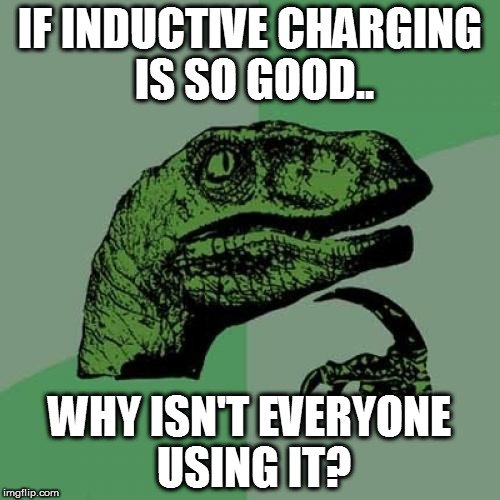
if-inductive-charging-is-so-good-meme
There are a few reasons behind that. The biggest drawback of inductive charging is its low efficiency, as a great deal of energy is lost as heat. As a result, your device takes much longer than usual to charge. Furthermore, it’s more expensive than your regular wired chargers.
Some people find it a little inconvenient too, as you have to keep your device on the mat the whole time that it’s being charged. Therefore, you don’t have the luxury to use it while it’s being charged. However, this has been taken care of by WiTricity’s wireless chargers, which can charge your phone from a distance.

Are inductive wireless chargers safe?

We have a tendency to be scared of anything that emits ‘waves’ and ‘signals’, and we invariably presume that they must be harmful to us in some way (like a microwave oven, WiFi router, and even smartphones). However, like most of the things listed here, inductive chargers are absolutely safe.
safer-than-regular-smartphone-chargers-even-meme
The electromagnetic field that an inductive charger creates is not strong enough to do any harm to humans. In fact, these chargers might even be safer than the regular ones, since they don’t operate with any wires, which means that you’re protected from even the tiniest chances of sustaining an electrical shock.
Eminent scientist Nikola Tesla pioneered the idea in the late 1800s that power could be transmitted through an electromagnetic field between two objects. In effect, he had envisioned the concept of inductive charging almost two centuries before it came into existence. No wonder he’s dubbed ‘the man who invented the 20th century’!

How Does Google Maps Know About Traffic Conditions?

A few months back, I left my house in the wee hours of the morning to catch a train at 8 AM. A drive from my house to the train station typically takes around an hour and a half. To be on the safe side, I left my house at 6 AM – 2 hours before the scheduled departure time of the train. 45 minutes into the drive, the traffic began slowing down. I began to get a little nervous, as that route didn’t usually have much traffic, especially in the early hours of the morning. Gradually, the traffic slowed even further until I found myself at a complete standstill. It was the very definition of moving at a snail’s pace.
It continued like that for almost 30 minutes. Towards the end of the traffic jam, I saw that a truck had toppled over, which had caused some serious damage to the road and slowed down the traffic. Afterwards, I drove as fast as I safely could, but just as I reached the platform, I saw the very last car of the train pulling out of the station. I had missed it!
I learned a life-changing lesson from this experience: it’s practically a technological sin to not check the current traffic before embarking on a long or critical ride on the road.
so-you-embark-on-important-drives-without-checking-traffic-status-meme
In the past, the only way you could learn about how the traffic was moving on a particular road was to tune in to the hourly radio broadcasts. However, thanks to the level of sophistication that we’ve attained today, we can check the status in real-time via Google Maps. Many phone applications and programs rely on Google’s data to provide accurate information relating to your geographical location.
Finding locations is still not too difficult if you have access to a map of the area, but we still can’t know about traffic conditions without some help. Google Traffic does exactly that for you, but have you ever wondered how they accomplish it?
map-meme 
Short answer: Google used to rely on traffic sensor data, but now it collects traffic-related information from its own users who have toggled their location to ‘on’ in the Google Maps app.
Google has a special built-in feature called Google Traffic on its Maps app that shows traffic conditions in real-time on major roads in particular geographic locations. If you have the Google Maps app on your smartphone (or any other electronic device), you can access info on the current traffic conditions on any given road/highway.

How does Google Maps know about current traffic conditions?

Traffic sensors

road cameras
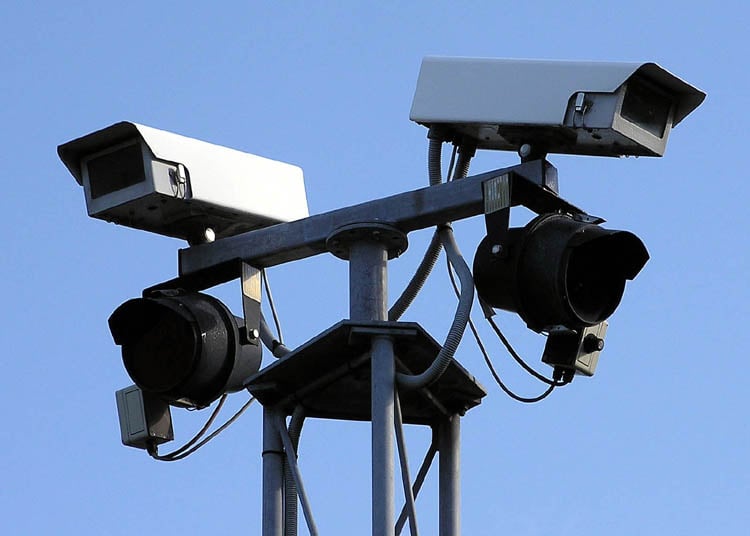
Closed-circuit television cameras (Photo Credit: Adrian Pingstone / Wikimedia Commons)
Until 2009, Google collected data from traffic sensors and cameras on the roads that were mostly installed by government transportation agencies and certain private companies that compiled traffic data for various purposes. These traffic sensors used laser radar or active infrared technology that could detect how fast the overall traffic was moving by observing the general size and speed of automobiles. This information was then transmitted to servers, and regular traffic updates could then be announced. Google also obtained data from these sources and embedded it in their Maps app to inform users of the traffic conditions.
traffic sensors
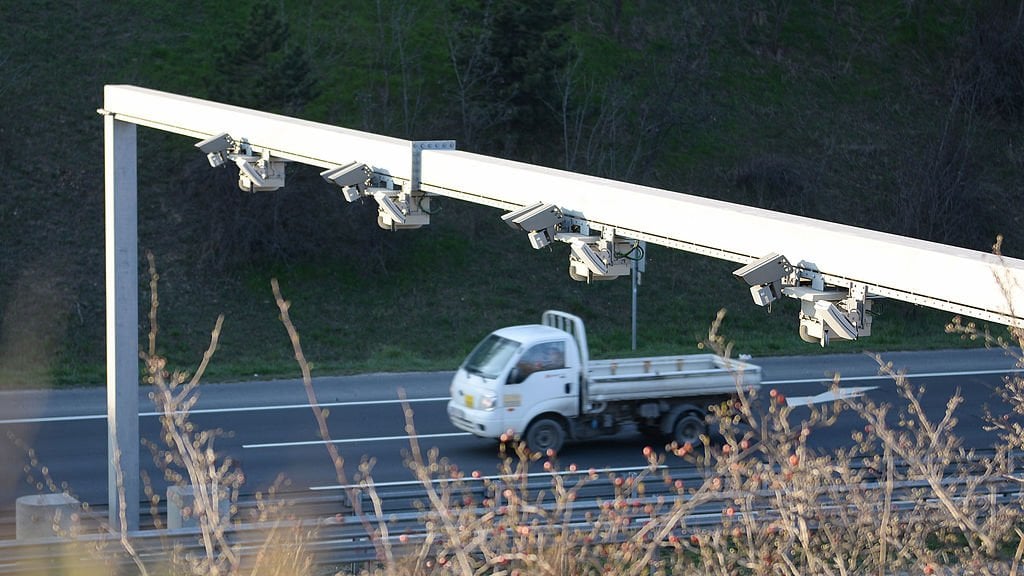
A sensing and monitoring system installed on a detection point for vehicle traffic surveillance and data gathering (Photo Credit: Cameramann / Wikimedia Commons)
Unfortunately, there were a number of drawbacks to this technique. Firstly, these sensors were only installed on important streets, i.e. the roads that were most prone to traffic. Therefore, if you wanted to take an alternate, lesser-used route to your destination, but there was an unexpected traffic jam on it, you wouldn’t know about it in advance. Furthermore, with traffic sensors, you could never get updates on the current traffic on a particular road instantaneously on your smartphone or other handheld device.

Crowdsourcing

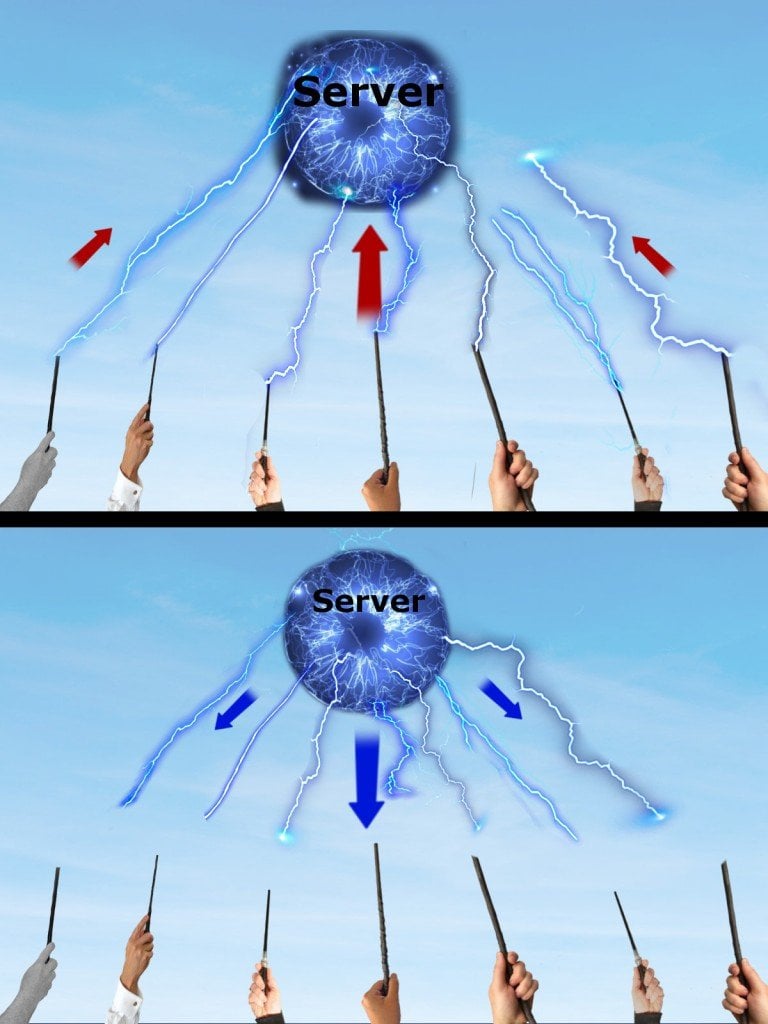
In 2009, Google shifted to crowdsourcing – a sophisticated, quicker and much more reliable technique of obtaining real-time traffic data. Below is a simplified illustration of how crowdsourcing works:
croudsourcing illustration
First, a large number of people anonymously feed data into a server, which then sends useful, actionable information back to its contributors after some data crunching and analysis.

How does crowdsourcing help Google collect traffic data?

Crowdsourcing is a very interesting sourcing model to collect information. It works like this… suppose you want to provide real-time updates on traffic conditions to users. You first develop an application where users can get directions to places, i.e. a GPS. program. However, in order for a user to get information about the current traffic conditions, she would also have to (anonymously) share her own geographic location with the app. Aside from that one user, there are many other users who want traffic updates of the same route. Therefore, all of them would be required to share their geographic location with the app to access the traffic conditions on a given road.
expect-collective-information-without-sharing-their-own-data-first-meme
This way, you (as the app developer) would get loads of information about a particular geographic location, including the number of active users in that area, the speeds of various automobiles where your app is currently in use (through GPS satellites), the “density” of automobiles and a number of other data points. Using all this information, you would provide real-time traffic updates to all of your app’s users by first obtaining information from them. This is how crowdsourcing works – you take information from your app’s users, create an aggregate of data, do some quick analysis and then transmit meaningful, actionable information back to your users.
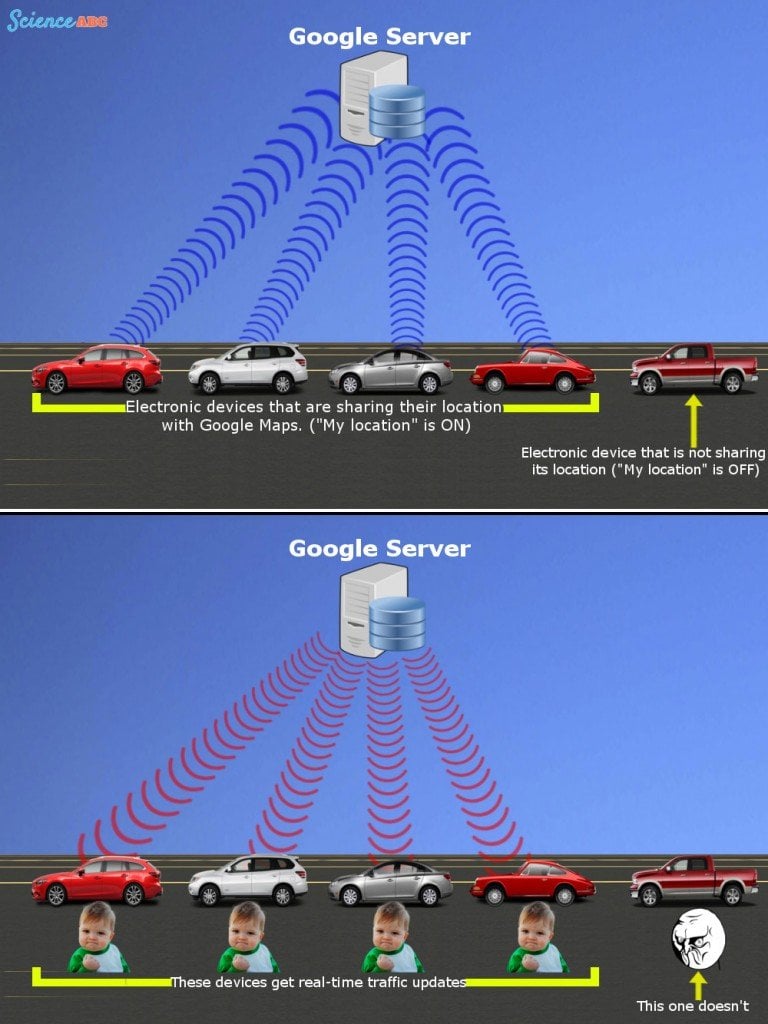
This is precisely how Google tells you about the traffic conditions in your precise area. Once you toggle ‘My Location’ on in Google Maps, you will automatically start sending your location data to Google’s servers.
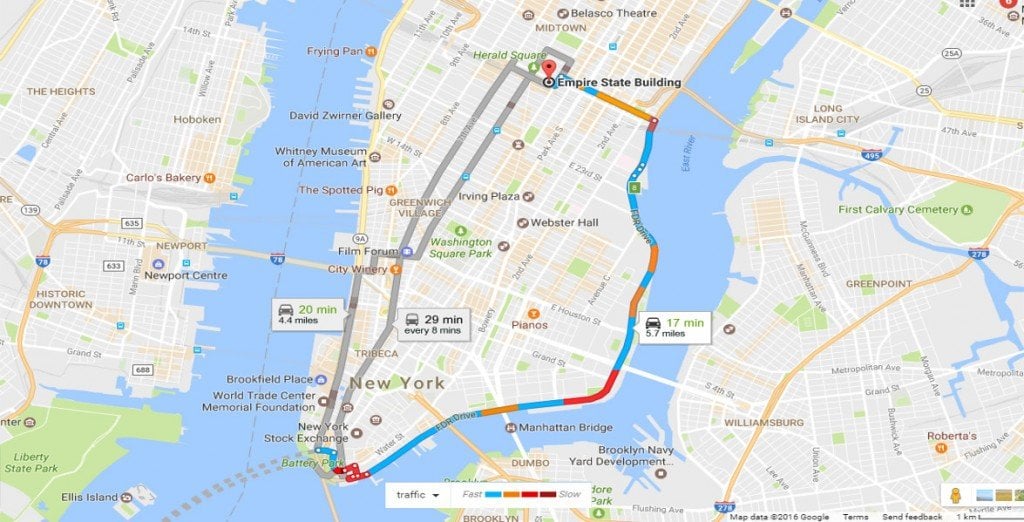
Google Traffic map Boston to Manhattan1
Photo Credit : GoogleMaps
While travelling on a busy road, you might be near other travellers who also have toggled their location to ‘on’ in the app, and are therefore automatically sharing traffic info with Google. When Google sees that there are a few slow-moving vehicles (or a lot of slow-moving, Maps-bearing smartphones) in a particular area, it indicates this with a yellow line on Maps. Similarly, if there has been an obstruction or a diversion resulting in a proper traffic jam, it indicates this hindrance with a red line in Maps.
Google server traffic location GPS tracking maps
You can always opt out of the system by choosing not to share your location with Google. Your privacy might be protected, but you won’t be able to learn if there’s a traffic jam on the road ahead!
It is important to note that Google claims that the sharing of your smartphone location is completely anonymous, so Google doesn’t know the exact source of the incoming information. This is extremely important, as it results in a reliable, secure ecosystem where users can share information for the collective good without compromising their own privacy.

Sunday, 11 December 2016

TESLA TURBINE

We all know about Nikola Tesla, what he did for the human race. His ideas and inventions led us till the future where somewhere we are procedding.
still at this date his ideas are used and are in practice.

Today we are going to talk about one of his inventions that is the TESLA TURBINE.
This turbine has the highest efficiency ever recorded, still in this date also the turbine hold the 1st rank above all.

Here is a video about it. Check it out.
   
Here is an image about the efficinecy of this turbine.


Image result for tesla turbine efficiency 


I hope you got a glimpse of what this turbine has the capability to do. if this small turbine is connected with a small motor then it would help to generate power of 2.4V . Although if we use bigger turbine and connect it with bigger motor then this would give us desired power output.

Thank You 

Regards
Nishit Joshi 


Saturday, 10 December 2016

What Is '' T I M E ''

BEYOUND GRAVITY AND FUTURE ALSO THE PAST AND PRESENT THERE LIES A CHAIN, A LINE OF CONTROL WHICH AFFECTS OUR DAY TO DAY LIFE CALLED T I M E 

Today we are going to talk about TIME beacuse although we are bound to it, yet we are not.

What ever we do where we do, it is TIME. it like Air which surrounded around us but yet we can not see it, though we can feel it.

TIME IS THE UNIT TO EVERYTHING EXISTING IN PAST PRESENT AND THE FUTURE. 

But how to understand time. It's simple what ever you do irrespective of anything anywhere it is recorded in TIME JUST LIKE A MEMORY. Except there are two copies of it one in the time and other in our counsicousness which will be carried out with us after death in other physical form.
And if one wants to know what happened in this era at this moment then, too there are various ways to know. Amongst which some are elisted below
-) DEEP MEDITATION
-) HYPNOTISM
-) TIME TRAVELLING. AND MUCH MORE.

So don't stick to the hands of TIME  as they will only give you loads of work, tons of stress and no relifment. if you want to enjoy time while being bound to it JUST BE YOU. AND DONT ACT. ITS THAT SIMPLE.

If you want to share your views please leave a comment in the comment box below. and I will surely reply to it.

REGARDS,
NISHIT JOSHI